Plugged In: What Power Adapters Work in South Africa (Type M Explained)
South Africa uses big three‑prong Type M sockets—and a few others. Here’s the no‑stress packing list and smart charging tips to keep every device powered in Cape Town.
Why this matters before you fly
Nothing stalls a Cape Town itinerary faster than a dead phone when you’re lining up the perfect shot of Table Mountain or tapping for rides. South Africa’s outlets are different from most of the world, and the key is understanding the big three‑pronged Type M plug you’ll see almost everywhere. With a little prep, you’ll charge everything—from phones and cameras to laptops and CPAP machines—safely and efficiently.
Meet Type M: South Africa’s big three‑prong plug
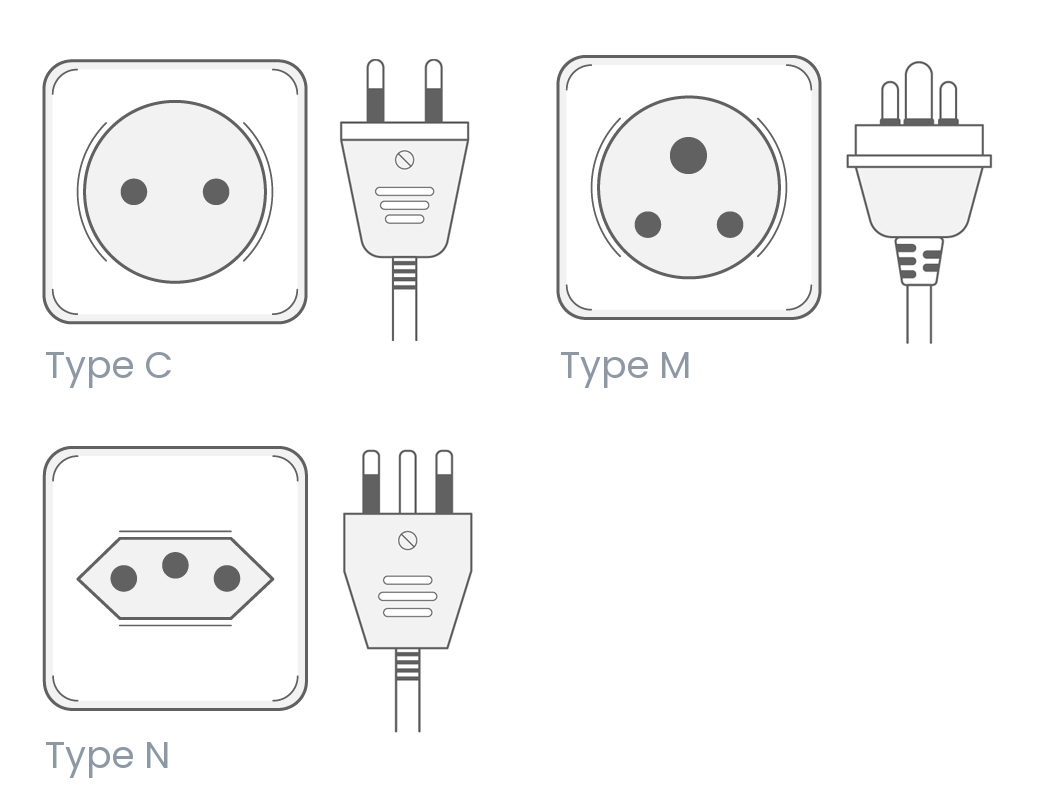
Type M is the classic South African socket: three round pins in a wide triangle, with the top pin (earth) noticeably thicker and longer than the other two. It’s larger than the more familiar European plugs and different from the UK’s flat‑bladed plug. The most important takeaways:
- Shape: Three round pins in a triangle; the top earth pin is chunky and spaced farther apart than in other systems.
- Where you’ll see it: In most homes, older buildings, and plenty of hotels and self‑catering stays across South Africa, including Cape Town.
- What it accepts: Only Type M plugs (and adapters made for Type M). Your EU two‑pin or UK three‑pin will not fit directly.
Alongside Type M, you may also encounter:
- Type N: A newer three‑round‑pin standard with smaller pins and a more compact triangle. Increasingly common in renovations and new builds.
- Type C: The slim European two‑pin (Europlug). You’ll sometimes find dedicated two‑pin sockets or combination outlets that accept it—great for phone chargers.
- Type D: An older three‑pin round standard seen occasionally; less likely on a typical Cape Town trip but worth noting.
Because multiple standards coexist, the simplest approach is to pack an adapter that explicitly supports Type M and, ideally, Type N. Do not assume a generic “world adapter” covers Type M—many do not unless it’s clearly listed.
Voltage, frequency and whether you need a converter
South Africa runs on 230V at 50Hz.
- If your device says 100–240V, 50/60Hz (most phones, tablets, laptops, cameras, e‑readers, power banks), you only need a plug adapter—not a voltage converter.
- If your device is single‑voltage (often older hair dryers/straighteners and some specialty appliances from 110V regions), you have two options:
- Pack a dual‑voltage travel version and skip the bulk and heat of converters.
- Use a reliable step‑down voltage converter sized for the device’s wattage. Converters are heavy and can run hot—use carefully and sparingly.
Tip: Laptop bricks and modern USB‑C chargers are almost always dual‑voltage. Check the fine print on the plug or charger block.
The minimalist packing list that actually works
If you like to travel light but charge many things, this setup keeps it simple:
- 1–2 Type M plug adapters (grounded). Grounded adapters are safest for metal‑chassis laptops.
- 1 compact universal adapter that explicitly lists Type M and Type N. This covers mixed outlets you may encounter.
- 1 GaN multi‑port USB‑C charger (65W–100W). Charge phones, tablets, cameras, earbuds, and even some laptops from one brick.
- 1 travel power strip or short extension (100–240V rated). Plug the strip into the wall with a single Type M adapter; charge multiple devices from its outputs. Choose a strip with universal inputs or multiple USB‑C/USB‑A ports.
- 1 high‑capacity power bank (10,000–20,000 mAh) with USB‑C PD. Great for long days on the Peninsula or Robben Island trips.
- Cables galore: extra USB‑C, Lightning (if needed), and a spare camera battery/charger.
- Optional: a small surge‑protected adapter or power strip. Power can fluctuate; good chargers already have protection, but a little extra peace of mind helps.
Smart charging during potential power cuts
South Africa has experienced periodic rolling outages. While schedules change and many neighborhoods go long stretches without interruptions, it’s smart to build good charging habits:
- Top up whenever you’re indoors. Make it automatic to plug in on return.
- Prioritize: charge the power bank and phone first, then camera batteries and wearables.
- Download offline maps and tickets so you’re never stranded by a signal or power hiccup.
- Consider a tiny travel UPS for a Wi‑Fi router if you carry one, or work offline with synced docs during brief interruptions.
If you prefer a base with solid building infrastructure, Postcard Views of Table Mountain. Generator for elevator. keeps vertical access running even during wider area disruptions—still, bring a power bank so your devices stay topped up wherever you are.
Common device scenarios (and what to pack)
- Phone/tablet/e‑reader: Dual‑voltage; use a Type M adapter plus your USB‑C charger. A multi‑port charger declutters the nightstand.
- Laptop: Dual‑voltage; use a grounded Type M adapter. If you edit photos/video, bring a 100W USB‑C charger and a spare cable.
- Camera: Most battery chargers are dual‑voltage. Carry a second battery so one is always ready.
- Electric toothbrush/razor: Modern models are usually 100–240V; older ones may not be. Check the base.
- Hair dryer/straightener: If yours isn’t dual‑voltage, pack a travel version rated 220–240V or use a properly sized converter (often not worth the hassle).
- CPAP: Most modern units auto‑switch to 100–240V; confirm your model and bring a grounded adapter. Consider a travel battery if medically necessary.
- Travel kettle/immersion heater: These draw high wattage and are often single‑voltage—verify ratings before using.
Safety basics you’ll notice in South Africa
- Wall switches: Many outlets have individual on/off switches. Turn outlets off before plugging in or removing adapters.
- Don’t overload: High‑watt hair tools and kettles should be used solo, not on the same multi‑plug as laptops and chargers.
- Keep adapters visible: Large Type M adapters can be weighty. Use a short extension to reduce strain on the wall socket.
- Ground when needed: For laptops and other sensitive gear, prefer a grounded adapter.
Where to buy or replace adapters in Cape Town
Forgot your adapter? You’re covered.
- At arrival: Airport convenience stores usually stock Type M adapters.
- In the city: Major malls and shopping areas such as the V&A Waterfront and Canal Walk have pharmacies and electronics shops that typically carry Type M and multi‑standard adapters.
- Likely retailers: Pharmacies (e.g., Clicks), supermarkets (e.g., Checkers, Pick n Pay), electronics stores, and hardware outlets. Staff know the “South Africa three‑prong” on sight.
Prices are reasonable, but if you need a very specific feature—like a high‑watt USB‑C PD charger—buy before you travel.
Quick answers: what plugs work where?
- Will my European two‑pin (Type C) work? Sometimes. If your room has a dedicated two‑pin socket or a combination outlet, yes. It will not fit a pure Type M socket without an adapter.
- Do UK plugs fit? No. Bring an adapter that supports Type M (and ideally Type N).
- Is a converter necessary for phones and laptops? No—most are dual‑voltage. You only need a plug adapter.
- What are South Africa’s specs? 230V, 50Hz.
- Are USB wall outlets common? Increasingly, but don’t rely on them. Your own multi‑port USB‑C charger is more dependable.
A simple one‑bag charging setup (example)
- One grounded Type M adapter
- One compact Type M/N universal adapter
- One 65–100W GaN USB‑C charger with two USB‑C and one USB‑A port
- One short, lightweight power strip (universal inputs)
- Two USB‑C cables, one Lightning (if needed), and a spare camera battery
- One 10,000–20,000 mAh power bank
With that kit, you can plug a single adapter into the wall and charge 4–6 devices at once, neatly and safely.
Stay—and charge—by the ocean or the Waterfront
If you like waking to sea views and setting up a tidy charging station before heading out, Milnerton’s high‑rise coastline is hard to beat. Consider:
- Large Apartment Stunning Ocean Views. A breezy self‑catering base with space to spread out your gear between beach walks and Blouberg sunsets.
- Amazing Ocean Views from Every Room. Ideal if you want a serene end‑of‑day recharge (you and your devices) after drives along the West Coast.
Prefer to stroll to coffee, museums, and sunset cruises? Base yourself near the harbor at Walk to the V&A Waterfront from a Charming Apartment. and keep your multi‑port charger humming while you explore Zeitz MOCAA, the Aquarium, and the Silo District.
Final take
- Type M is the mainstay in South Africa; Type N and occasional two‑pin options also appear.
- Bring at least one grounded Type M adapter and a multi‑port USB‑C charger.
- Most modern electronics are dual‑voltage (no converter needed).
- A small power strip and a power bank make you outage‑resilient and hotel‑agnostic.
Pack this way and you’ll spend zero time hunting for outlets—and all your time enjoying Cape Town’s mountains, markets, and ocean air.